
New · v0.1.0 ·
A desktop control panel for Minecraft servers over RCONRun your server from a window, not a terminal.
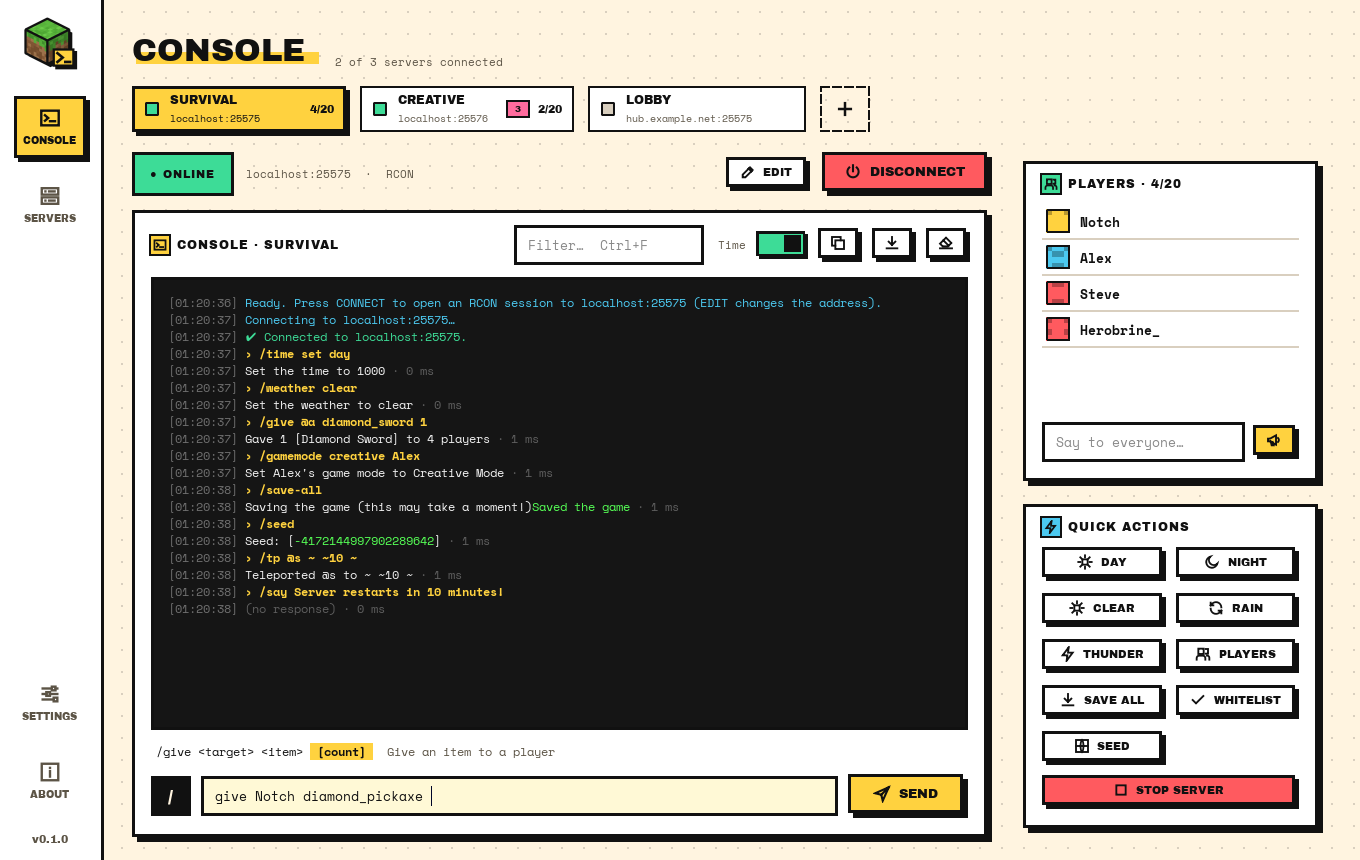
MCRCON GUI connects to your Minecraft server over RCON and gives you a proper console: Tab completion for commands and player names, a live players list, and as many servers as you run, side by side.
Free and open source · MIT · View the code on GitHub
At a glance
MCRCON GUI is a free, open-source desktop app for running Minecraft server commands over RCON. It has Tab completion that knows vanilla commands and the players online, keeps several servers connected at once, and shows who is playing in a side panel. The current version is 0.1.0, released November 17, 2026.
- Price
- Free
- License
- MIT, open source
- Windows
- 10 & 11 · 64-bit
- macOS / Linux
- Run from source
- Servers
- Java Edition with RCON
- Made by
- H190K
01 / Features
Built for people who type commands all day.
Everything you'd otherwise do in a bare RCON prompt, with less typing and fewer typos.
Tab completion that knows Minecraft
Around 60 vanilla commands and their arguments, plus game modes, game rules, items, effects, enchantments and the names of the players online right now.
Several servers at once
Save as many servers as you like and keep more than one connected. Each gets its own console, command history and status.
Players panel
A live list of who is online, refreshed every 30 seconds and after kicks or bans. Right-click a name to message, teleport, op, kick or ban.
Light and dark
Both themes use the same chunky look. Pick one, or let the app follow your system setting.
Reconnects by itself
When a server restarts or the connection drops, the app tries again on its own and waits a little longer between attempts.
Built-in RCON client
The protocol is written in plain Python, multi-packet replies included. No mcrcon.exe or other external binary to keep around.
Passwords encrypted
On Windows, saved RCON passwords are encrypted with your Windows account (DPAPI), so another user on the PC can't read them.
Automatic updates
The installed app checks for a new version every time it starts and every 24 hours while it stays open, downloads it in the background and checks its SHA-256 before installing.
02 / Tab completion
Press Tab. Get the rest.
Type the start of a word and press Tab. kill Al becomes kill Alex, because Alex is online right now. Type /game and you get a list: gamemode or gamerule.
The line under the console shows the syntax of the command you're writing, like gamemode <mode> [target], with the current argument highlighted. It works inside nested commands too: execute as @a run give carries on with the arguments of give.
Plugin commands from Paper, Spigot or Fabric mods are picked up from the server's help output and offered by name.
> kill AlexTab
> kill Alex
Killed Alex · 2 ms
> /gameTab
gamemode <mode> [target]Set a player's game mode03 / Screens
Three panels, one window.
Servers and quick actions on the left, the console in the middle, players and a broadcast box on the right.


04 / Setup
Switch on RCON, then connect.
RCON is off by default on every Minecraft server. It takes three lines.
Edit server.properties
Add or change these lines, with a long random password:
enable-rcon=true rcon.port=25575 rcon.password=pick-a-long-random-passwordRestart the server
RCON settings are only read at startup. Keep the port closed to the internet: RCON traffic isn't encrypted, so use it on your LAN or through a VPN or SSH tunnel.
Connect
In the app, press Edit (or + Add for another server), enter the host, port and password, then Connect. Ctrl+Enter does the same.
05 / FAQ
Questions, answered.
Still stuck? Open an issue on GitHub and attach crash.log from the settings folder if the app won't start.
Is MCRCON GUI free?
Yes. MCRCON GUI is free and open source under the MIT License. There are no ads, no account and no paid tier. The full source code is on GitHub.
Which servers does it work with?
Any Minecraft: Java Edition server with RCON switched on: vanilla, Paper, Spigot, Purpur, Fabric and Forge all use the same protocol. Commands added by plugins show up in the completion list after you connect.
Does it work with Bedrock Edition?
No. Bedrock servers don't support RCON, so there is nothing for the app to connect to.
It says "connection refused". What now?
RCON isn't enabled, the port is wrong, or the server isn't running. Check enable-rcon and rcon.port in server.properties, then restart the server.
It says "Wrong RCON password".
Copy rcon.password from server.properties exactly. It's case-sensitive, and stray spaces count.
It connects at home but not from somewhere else.
The RCON port has to be reachable from where you are. RCON traffic isn't encrypted, so rather than opening the port to the internet, connect through a VPN or an SSH tunnel.
Is there a Mac or Linux version?
Not as a download yet. The app runs from source on macOS and Linux with Python 3.10 or newer; the download page has the three commands you need. Native builds are planned.
Why does Windows show a SmartScreen warning?
The installer isn't code-signed, so Windows doesn't recognise it yet. Click More info, then Run anyway. If you want to be sure the file is the one that was published, compare its SHA-256 checksum with the one on the download page.
100% open source
Every line is on GitHub.
MCRCON GUI is completely open source under the MIT License. The app you download is built from the same code that's in the public repository: no closed parts, no telemetry, nothing extra bundled in. Use it, change it, ship your own build.
Free forever
If it saves you time
MCRCON GUI is free and stays free. If you'd like to help keep it going, star the repo, report bugs, and tell other server admins about it.
Ready when your server is.
Free for Windows 10 & 11. No admin rights needed to install.
Or grab the portable zip, or run it from source on macOS and Linux.